AMZTool/Blog/Create Ads in Bulk

Guide

3 Ways to Create Amazon Ads in Bulk

If you need to create Amazon ads in bulk, you have three main options: manual setup in Seller Central, Amazon's bulk sheet system, or third-party tools that use the Advertising API. This guide walks through all three methods so you can pick the one that fits your workflow, budget, and campaign volume.

Also available in: 中文版

William
William
10 min read·Published: April 10, 2026
Share:
Skip manual template editing next time.Build Your First Bulk Sheet →
Why trust this guide? I have created large volumes of Amazon Sponsored Products campaigns across real launch and management workflows. I have used all three methods — manual creation in Seller Central, Amazon's bulk sheet upload, and API-based tools — and I built AMZTool specifically because none of the existing options were fast enough for the volume I needed.

Quick Answer

  • Manual (Seller Central) — Best for 1–5 campaigns. Free, no learning curve, but painfully slow at scale.
  • Bulk Sheet (.xlsx upload) — Best for 5–500 campaigns. Requires understanding the bulk sheet format, but dramatically faster than manual.
  • API Tools — Best for 500+ campaigns or fully automated workflows. Requires technical setup or a paid tool subscription.

When Do You Need Bulk Creation?

You probably don't need bulk creation if you're running a handful of campaigns for a single product. But once any of these apply, manual creation becomes a bottleneck:

  • You're launching a new product and need 10+ campaigns across match types
  • You manage multiple ASINs and want consistent campaign structures
  • You're scaling from 1 marketplace to 2–3 (US, UK, DE, etc.)
  • You need to replicate a campaign structure across multiple SKUs
  • You're an agency onboarding a new client with dozens of products

If you don't fall into any of those categories, stick with Seller Central. It's free and it works. But if you do, here's how each method compares.

Signs you've outgrown manual creation

  • Campaign setup takes more than 30 minutes per product
  • You're copy-pasting settings between campaigns and making errors
  • You've missed a match type or targeting group because of fatigue
  • You dread launching new products because of the PPC setup work

Method 1: Seller Central — Manual Campaign Creation

This is where everyone starts. You go to Amazon Ads > Campaign Manager > Create Campaign, fill out the form, add keywords or targets, set bids, and save.

How it works

Each campaign is created one at a time through the Amazon Ads console. You select your campaign type (Sponsored Products, Brands, or Display), choose targeting (automatic or manual), add your products, set your budget and bids, then add keywords or product targets.

Pros

  • Free — no tools needed
  • No learning curve beyond basic PPC knowledge
  • Real-time feedback — campaigns go live immediately
  • Good for testing a single campaign structure before scaling

Cons

  • Extremely slow at scale — each campaign takes 5–15 minutes
  • Repetitive data entry leads to errors (wrong match type, missed negative keywords)
  • No way to template or reuse campaign structures
  • No version control or audit trail

Time estimate

Campaign CountEstimated TimeNotes
1–3 campaigns15–45 minTotally fine for this volume
5–10 campaigns1–2.5 hoursStarts to feel tedious
20+ campaigns5+ hoursError-prone, not recommended
50+ campaignsFull day+Use bulk sheet or API instead

Bottom line: Manual creation is fine for small-scale work. Once you regularly create more than 5 campaigns at a time, you should switch to bulk sheets.

Method 2: Bulk Sheet — Amazon's .xlsx Upload System

Amazon's bulk operations feature lets you download a spreadsheet template, fill in campaign data across rows, and upload the file to create (or modify) campaigns in bulk. This is the most common method for mid-volume sellers and agencies.

How it works

You download a bulk sheet template from Campaign Manager > Bulk Operations. The file has specific columns for Record Type, Campaign Name, Budget, Keyword Text, Match Type, Bid, etc. Each row represents one entity — a campaign, an ad group, a keyword, or a product ad. You fill in the rows, upload the file, and Amazon processes it.

Two approaches to bulk sheets

A. Manual Excel editing

You fill in the spreadsheet manually. This works, but it's error-prone: one wrong column value or missing Record ID can cause an entire batch to fail. Formatting issues (especially with Match Type and Entity Type) are the most common reason uploads get rejected.

B. Visual bulk sheet builders (like AMZTool)

Tools like AMZTool provide a visual interface where you configure campaigns, ad groups, keywords, and targets, then export a correctly formatted .xlsx file. This eliminates formatting errors and lets you build complex structures (multiple match types, negative keywords, auto + manual targeting) in minutes instead of hours.

Pros

  • Much faster than manual — 10x to 50x speed improvement at scale
  • Supports all Sponsored Products campaign configurations
  • Reusable templates — build once, duplicate for new products
  • Audit trail — you have the file as a record of what was created
  • No API access needed — works with any Seller Central account

Cons

  • Learning curve for raw Excel editing (column mapping, Record Types)
  • Upload processing can take 5–30 minutes
  • Error messages from Amazon can be cryptic
  • Limited to Sponsored Products for most bulk operations

Time comparison

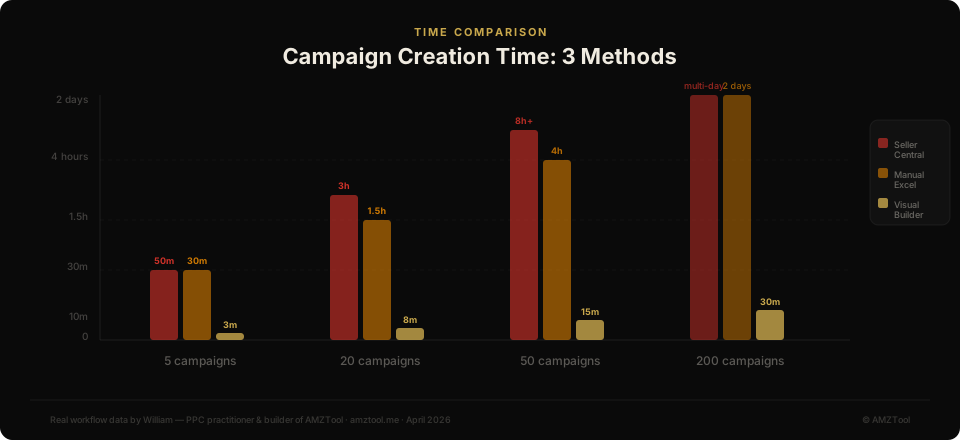
Campaign CountSeller Central (Manual)Manual ExcelVisual Builder (AMZTool)
5 campaigns1–2 hours30–45 min5–10 min
20 campaigns5+ hours2–3 hours15–25 min
50 campaignsFull day4–6 hours25–40 min
200 campaignsNot practical2+ days1–2 hours
Bar chart comparing campaign creation time across Seller Central, manual Excel, and visual bulk sheet builder for 5 to 200 campaigns

Time comparison — the gap widens dramatically at higher campaign counts

For a deeper dive into how the bulk sheet format works, see: Amazon Ads Bulk Sheet Explained.

Bottom line: Bulk sheets are the sweet spot for most sellers. If you use a visual builder, you get the speed of automation without needing API access or technical skills.

Method 3: API Tools — Amazon Advertising API

Amazon's Advertising API allows programmatic campaign creation. Instead of filling in a spreadsheet, you send structured requests to Amazon's servers. This is the most powerful method — and the most complex.

How it works

You (or a tool you use) authenticates with the Amazon Advertising API using OAuth credentials tied to your seller/vendor account. Then you send JSON payloads to create campaigns, ad groups, keywords, and targets. Responses come back with status codes and entity IDs.

Who uses API tools?

  • Agencies managing 50+ brands who need fully automated campaign deployment
  • Enterprise sellers with custom internal tools
  • Software companies building PPC management platforms (Helium 10, Pacvue, Perpetua, etc.)
  • Advanced sellers who write scripts to automate repetitive PPC tasks

Examples of API-based tools

  • Helium 10 Adtomic — Full PPC management suite with API integration
  • Pacvue — Enterprise-grade platform for large brands and agencies
  • Perpetua — AI-driven campaign management via API
  • Custom scripts — Python/Node.js scripts using the Amazon Ads API directly

Pros

  • Fastest method at extreme scale (500+ campaigns)
  • Full automation — no manual steps after initial setup
  • Can integrate with other systems (inventory, pricing, analytics)
  • Real-time campaign creation — no upload processing delay

Cons

  • High technical barrier — requires developer resources or paid tools
  • API access requires approval from Amazon (not instant)
  • Paid tools cost $99–$500+/month
  • Overkill for most sellers — the complexity isn't justified under 500 campaigns
  • API rate limits can slow down very large batch operations

Bottom line: API tools are the right choice for agencies, enterprise sellers, or anyone who needs fully automated campaign deployment. For most individual sellers, bulk sheets offer 90% of the speed benefit with 10% of the complexity.

Side-by-Side Comparison

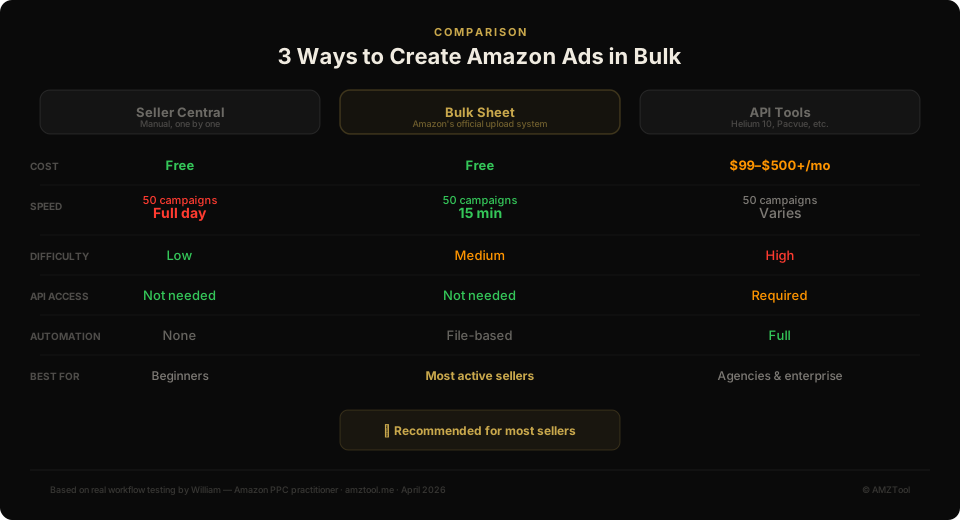
FactorManual (Seller Central)Bulk SheetAPI Tools
CostFreeFree – $19.90/mo$99 – $500+/mo
Speed (50 campaigns)Full day25–40 min5–15 min
DifficultyLowLow–MediumHigh
Best for1–5 campaigns5–500 campaigns500+ campaigns
AutomationNoneTemplate reuseFull automation
Technical skill neededNoneBasic (with visual builder)Developer-level
Comparison of 3 Amazon bulk ad creation methods: Seller Central manual, Bulk Sheet, and API tools — showing cost, speed, difficulty, and best use cases

Visual overview — each method has a clear best-fit range

Which Method Should You Choose?

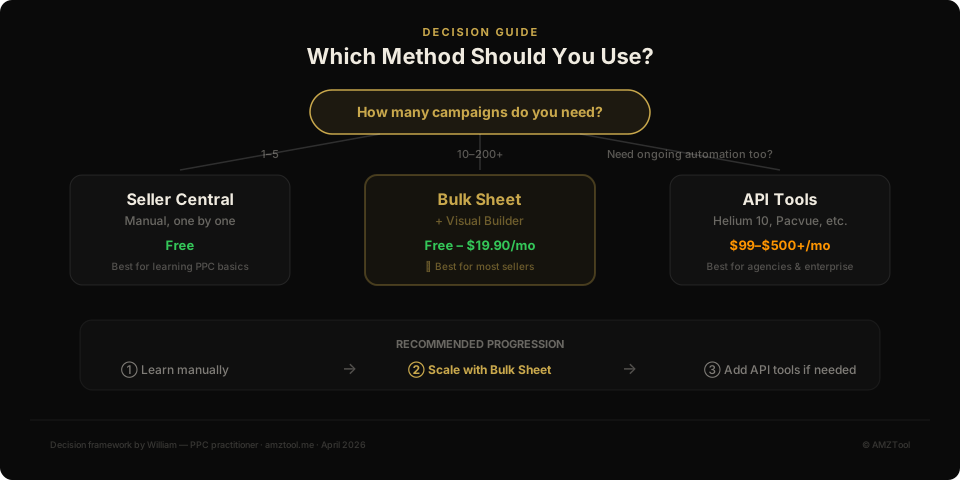
Decision flowchart for choosing between manual, bulk sheet, and API campaign creation methods based on campaign volume and automation needs

Decision framework — start with volume, then consider automation needs

The right method depends on three things: how many campaigns you create at a time, how often you create them, and your technical comfort level.

  • 1–5 campaigns, occasionally → Seller Central manual. No setup, no learning curve.
  • 5–50 campaigns, regularly → Bulk sheet with a visual builder like AMZTool. Best balance of speed and simplicity.
  • 50–500 campaigns, frequently → Bulk sheet with saved templates and dictionaries. AMZTool's Pro tier handles this well.
  • 500+ campaigns or full automation → API tools or a platform like Pacvue/Helium 10.
💡
Most sellers overestimate their scale needs. If you're creating fewer than 100 campaigns per month, a bulk sheet builder will handle your volume faster and cheaper than any API tool. Don't pay for automation you don't need yet.

What I Actually Recommend

After using all three methods extensively, here's my honest recommendation for most Amazon sellers:

  • Start with manual creation to learn how campaigns work. Understand the structure before you automate it.
  • Move to bulk sheets as soon as you're regularly creating 5+ campaigns. Use a visual builder — don't fight with raw Excel formatting.
  • Consider API tools only when you need full automation or you're managing enough volume that even bulk sheets feel slow.

The biggest time savings come from switching from manual to bulk sheet — not from bulk sheet to API. That first jump saves 80%+ of your campaign creation time. The second jump saves another 10–15%, but costs significantly more in money and complexity.

Frequently Asked Questions

Can I use bulk sheets for Sponsored Brands or Sponsored Display?
Amazon's bulk operations primarily support Sponsored Products. Sponsored Brands and Sponsored Display have more limited bulk support and often require API access or the Amazon Ads console for full configuration.
Is AMZTool the only bulk sheet builder?
No, but most alternatives are either raw Excel templates (error-prone) or features inside larger paid platforms ($99+/month). AMZTool is purpose-built for bulk sheet generation with a visual interface, starting with a free tier.
How long does it take Amazon to process a bulk sheet upload?
Typically 5–30 minutes, depending on file size and current system load. Files with errors may take longer because Amazon processes valid rows first, then reports errors separately.
Do I need API approval to use bulk sheets?
No. Bulk sheet upload works through Seller Central's Campaign Manager — no API access required. API approval is only needed if you're building custom integrations or using tools that connect directly to the Advertising API.
What's the maximum number of campaigns I can create in one bulk sheet?
Amazon doesn't publish a hard limit on campaigns per file, but practically, files with more than 500–1,000 campaigns can become slow to process. AMZTool supports up to 50 campaigns and 200 ad groups per file, which covers the vast majority of use cases.

Final Verdict

There's no single best way to create Amazon ads in bulk — there's only the best method for your current scale and workflow.

  • Manual is fine for learning and small-scale work.
  • Bulk sheets are the practical sweet spot for 90% of sellers.
  • API tools are for agencies, enterprise sellers, or anyone who has outgrown spreadsheets entirely.

If you're spending more than 30 minutes creating campaigns that could be templated, you're ready for bulk sheets. Start there — you can always scale up to API tools later if your volume demands it.

Related reads: Amazon Ads Bulk Sheet Explained · Amazon Bulk Upload Tutorial · Best Amazon PPC Tools

Build your next bulk sheet without template errors

AMZTool lets you create Sponsored Products campaign structures visually, reuse saved inputs, and export Amazon-ready files in minutes.

Build Your First Bulk SheetRead the Guide
William
William

Amazon PPC practitioner turned indie developer. I built AMZTool because I got tired of spending hours on repetitive campaign setup. When I'm not coding, I'm probably staring at ACOS numbers.

Published in:GuideBulk CreationPPCAmazon Ads
Share:

© 2026 AMZTool · About · Guide · Pricing · Blog